
Packaging artwork can look complete on screen and still require changes before it is suitable for production. Missing bleed, RGB colours, low-resolution images, altered dielines or incorrectly prepared finishing layers can all create additional prepress work before printing begins.
Print-ready artwork is therefore more than choosing the right file extension. The artwork needs to match the approved box structure, colour setup, image resolution, fonts, bleed, safe areas and any specialist finishing requirements. This guide explains the main checks to complete before sending custom box artwork for production.
What Makes Packaging Artwork Print-Ready?
Print-ready packaging artwork should be prepared on the approved dieline with the correct dimensions, bleed and safe areas. Process-colour artwork should use CMYK, raster images should generally be supplied at suitable high resolution at final print size, and fonts should be outlined or supplied with the project.
Foil, Spot UV, embossing, white ink and other specialist finishes should remain on separate, clearly labelled editable layers. Before production, the complete file should be reviewed against the selected material, printing method and finishing specification.
Why Print-Ready Artwork Matters
Correct artwork preparation helps the prepress and production teams reproduce the approved design without avoidable file corrections. It also makes it easier to check the artwork against the box structure, selected print method and finishing specification before manufacturing begins.
Common artwork problems can include:
- Unexpected colour shifts caused by incorrect colour setup.
- Soft or pixelated images supplied at insufficient resolution.
- Missing or substituted fonts.
- Artwork positioned too close to cuts, folds or glue areas.
- Missing bleed at trimmed edges.
- Incorrectly prepared foil, Spot UV or embossing layers.
- Incorrect product information, barcodes or other supplied content.
A well-prepared file does not guarantee every aspect of the final print, but it provides a stronger basis for proofing, prepress review and production approval.
Print-Ready Packaging Artwork at a Glance
- Start with the final approved dieline and do not resize or alter its structural dimensions.
- AI, press-quality PDF and EPS are preferred for professional packaging artwork, although other suitable formats can also be reviewed.
- Prepare process-colour artwork in CMYK and identify Pantone or other spot colours separately where required.
- Use suitable high-resolution raster images at their final printed size; vector graphics do not rely on DPI in the same way.
- Extend backgrounds into the required bleed and keep important artwork within the supplied safe areas.
- Outline fonts or include them with the project, and keep specialist finishing artwork on separate editable layers.
- Review the final proof carefully because digital proofs help check layout but do not automatically guarantee an exact printed colour match.
What Does Print-Ready Artwork Actually Mean?
Print-ready artwork is a production file that has been prepared around the approved packaging structure and printing specification. It should contain the information needed for prepress review without relying on missing fonts, low-resolution assets or altered structural guides.
The exact requirements can vary by box style, printing method and finish, but the following checks cover the main areas that should be reviewed before submission.
| Artwork Check | Recommended Setup | Why It Matters |
|---|---|---|
| File Format | AI, press-quality PDF or EPS preferred | Supports vector artwork, accurate dimensions and prepress editing |
| Colour | CMYK for process print; identify required spot colours separately | Reduces unexpected colour conversion during production |
| Raster Images | Suitable high resolution at final printed size; Healey recommends 300 DPI | Helps preserve image detail and avoid visible pixelation |
| Bleed | Extend edge-to-edge artwork at least 3 mm beyond the cut line | Allows for normal cutting tolerance after printing |
| Safe Area | Keep important content inside the supplied safe zone | Reduces the risk of text or logos sitting too close to cuts and folds |
| Fonts | Outline text or supply the required fonts | Prevents missing-font substitutions and text reflow |
| Dieline | Use the approved structure without resizing or moving cut and fold lines | Keeps artwork aligned with the manufactured box |
| Special Finishes | Use separate, clearly labelled editable layers | Allows foil, Spot UV, embossing and other effects to be prepared correctly |
1. Use a Suitable Production File Format
Editable vector artwork is generally preferred because logos, text and shapes can be reproduced cleanly at different sizes and the file remains easier to review during prepress.
Healey Packaging currently recommends:
- AI – Adobe Illustrator artwork.
- Press-quality PDF – suitable exported production file.
- EPS – vector artwork where appropriate.
PSD, INDD, TIFF and high-resolution PNG files can also be reviewed where vector artwork is not available. Canva or Figma artwork can be exported as a high-quality PDF for review before production.
2. Prepare Process-Colour Artwork in CMYK
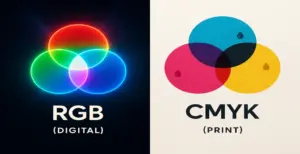
RGB is designed for digital displays, while CMYK is commonly used for full-colour process printing. Artwork supplied in RGB can change appearance when converted for production because some screen colours cannot be reproduced in the same way with CMYK inks or toners.
Prepare process-colour artwork in CMYK and identify any required Pantone or other spot colours separately. Do not rely on a monitor preview as an exact representation of the finished printed pack.
Colour Setup Guide Understand RGB vs CMYK for Packaging Print3. Check Raster Image Resolution at Final Print Size
Photographs and other raster images need enough resolution for the size at which they will actually be printed. Healey Packaging recommends 300 DPI at final print size for packaging artwork.
Do not enlarge a small website image and assume the DPI setting alone will restore lost detail. Screenshots, compressed web images and social-media graphics can contain too little source information for clean packaging print.
Vector logos, text and illustrations behave differently because they are defined mathematically and do not rely on image DPI in the same way.
4. Outline Fonts or Include Them With the Project
Missing fonts can cause text substitution, reflow and unexpected layout changes during prepress. Before submitting the final artwork, either convert text to outlines or provide the required font files where licensing and the production workflow allow.
Keep an editable working copy before outlining text so spelling, product information or regulatory wording can still be corrected if required.
5. Use the Approved Dieline, Bleed and Safe Areas
Prepare the artwork on the final approved packaging dieline. Do not resize, rotate, redraw or move structural lines unless the packaging team has approved a structural change.
- Extend backgrounds and edge-to-edge graphics at least 3 mm beyond the cut line.
- Keep logos, text and other important information within the supplied safe area.
- Keep important artwork away from folds, creases and glue areas where specified.
- Maintain the cut, fold, glue and artwork layers separately.
- Follow the line colours, layer names and structural conventions used in the supplied production dieline rather than applying your own universal colour system.
6. Make Sure Every Image Asset Is Available
Do not send an artwork file that relies on image links the production team cannot access. If your document contains linked images, package the required source assets with the project or provide them through an accessible file folder as agreed with the prepress team.
If images are embedded, check that the embedded versions have sufficient resolution and use the required colour setup. The important point is that no production asset should be missing when the file is reviewed.
Artwork Requirements View Healey Packaging’s Print-Ready Artwork GuidelinesPrepare Separate Artwork for Specialist Finishes
Foil stamping, Spot UV, embossing, debossing, white ink and selected varnishes normally require clearly defined production areas. Do not flatten these effects into the main printed artwork.
- Create a separate layer for each specialist finish.
- Label each layer clearly.
- Keep the finishing artwork editable.
- Use the required spot-colour setup agreed for the project.
- Confirm compatibility with the chosen board, laminate or coating.
How Packaging Materials Affect Artwork and Print
The same artwork can reproduce differently on different packaging materials. Board colour, surface texture, coating and printing method all influence contrast, detail and colour appearance, so the substrate should be considered before artwork is finalised.
Kraft Board
Natural brown kraft changes the background against which printed colours are viewed. Light colours and fine tonal artwork may need additional consideration, and some designs may require an opaque white layer or a different print approach where supported.
White Paperboard
Smooth white paperboards such as suitable SBS or folding boxboard grades can provide a bright base for detailed graphics, photography and small typography. Final reproduction still depends on the print method and board specification.
Black or Dark-Coloured Board
Dark substrates can reduce the visibility of standard process inks. Depending on the design and printing process, opaque white ink, foil or another suitable treatment may be considered for logos and lighter artwork.
Corrugated Board
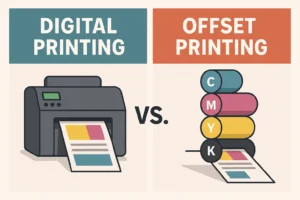
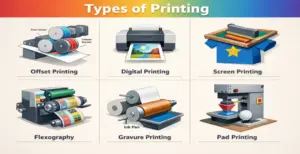
Corrugated packaging can be printed using different processes depending on the flute, liner, artwork complexity, quantity and required finish. Flexographic, digital and lithographic approaches can all be relevant in different specifications, so the print method should not be chosen from the word “corrugated” alone.
Printing Methods Compare Digital, Offset and Flexographic Packaging PrintFinal Artwork Checks Before Submission
- Confirm that the artwork uses the final approved dieline.
- Check spelling, product information, contact details and supplied legal or regulatory wording.
- Verify CMYK and any separately specified Pantone or spot colours.
- Confirm raster-image resolution at final print size.
- Check bleed and safe areas against the supplied dieline.
- Outline fonts or include the required font assets.
- Keep barcodes away from folds, joins and unsuitable finishing areas, and test critical printed barcodes where appropriate.
- Keep foil, Spot UV, embossing and other specialist finishes on separate editable layers.
- Review the final proof carefully before approving production.
Artwork Review vs Packaging Design Support
An artwork check and a full packaging design project are not the same service. If you already have production artwork, Healey Packaging can review the file for common prepress issues before production. Creating new artwork, structural designs, mock-ups or extensive revisions may form part of a separately scoped design service.
- Prepress artwork review.
- Dieline and structural-file checks.
- Colour, bleed and image-resolution checks.
- Specialist finishing-layer review.
- Packaging design and artwork development where separately agreed.
Common Questions About Packaging Artwork Files
Practical answers about file formats, CMYK, image resolution, bleed, dielines, fonts and specialist finishing artwork.
What is the best file format for custom box artwork?
Editable AI, press-quality PDF and EPS files are generally preferred because they support vector artwork and professional prepress workflows. Healey Packaging can also review formats such as PSD, INDD, TIFF and suitable high-resolution PNG files where necessary.
Can I submit artwork created in Canva or Figma?
Yes. Export the highest-quality print PDF available and have the file reviewed before production. Online design platforms may not provide the same prepress controls as professional packaging software, so colour setup, bleed, fonts and image quality should still be checked.
Does every part of my artwork need to be 300 DPI?
No. DPI mainly applies to raster images such as photographs. Healey Packaging recommends 300 DPI for raster artwork at final print size. Vector logos, text and illustrations can scale without relying on image resolution in the same way.
How much bleed should packaging artwork have?
Healey Packaging currently recommends extending backgrounds and edge-to-edge artwork at least 3 mm beyond the cut line. Always follow the final approved dieline because individual structures may contain additional folds, glue areas or production considerations.
Should I outline fonts before sending packaging artwork?
Outlining fonts is recommended because it removes dependence on fonts installed on another computer. Alternatively, provide the required font files where the workflow and font licence allow. Keep an editable source version before converting final text to outlines.
Should packaging images be linked or embedded?
Either workflow can be workable when prepared correctly. If images remain linked, include all required source assets so there are no missing links. If images are embedded, confirm that the embedded versions have sufficient resolution and the correct colour setup.
How should foil or Spot UV artwork be supplied?
Keep each specialist finish on a separate, clearly labelled editable layer. Foil, Spot UV, embossing, debossing, white ink and selected varnishes may require their own production separations rather than being flattened into the main CMYK artwork.
Does a digital proof guarantee the final printed colour?
No. A digital proof is useful for checking artwork, copy and panel placement, but monitor settings, printing method, ink or toner, material and finishing can affect the final physical colour. Discuss an appropriate physical or production proof if colour verification is particularly important.
What happens if my artwork is not print-ready?
Healey Packaging can review supplied artwork and identify common prepress issues before production. Minor technical corrections and a full packaging design project are different scopes, so confirm what work is included if substantial artwork development is required.
Final Thoughts: Check the File Before Production
Print-ready packaging artwork brings the structural dieline, colour setup, images, typography and finishing requirements into one production file. The goal is not simply to make the artwork look correct on screen, but to prepare it for the way the box will actually be printed, cut, folded and finished.
Use the approved dieline, check CMYK and spot colours, review raster-image resolution, keep important content within safe areas and separate specialist finishing layers. Before production begins, review the proof and make sure the approved artwork version matches the final packaging specification.
If you already have artwork, Healey Packaging can review the file for common prepress issues. If you need structural or visual design development as well, that can be discussed separately around the scope of your project.
Ready to Submit Artwork? Review the Full Print-Ready Artwork Guidelines